以下文章来源于OpenFPGA,作者碎碎思
当你还在用C语言写GPIO、用Verilog连LED的时候,有人已经开始用一门“冷门但强大”的语言——Ada,在Zynq上点灯了。
1.1 设置 EMIO 允许PS控制 LED
在 Zedboard 上,LED 只能通过可编程逻辑 (PL)(FPGA)端进行控制,因为物理引脚仅连接到现场可编程门阵列 (FPGA)。因此,CPU 无法直接控制 LED。CPU 指令必须通过 PL 进行路由,这可以通过扩展多路复用输入/输出 (EMIO) 来实现。
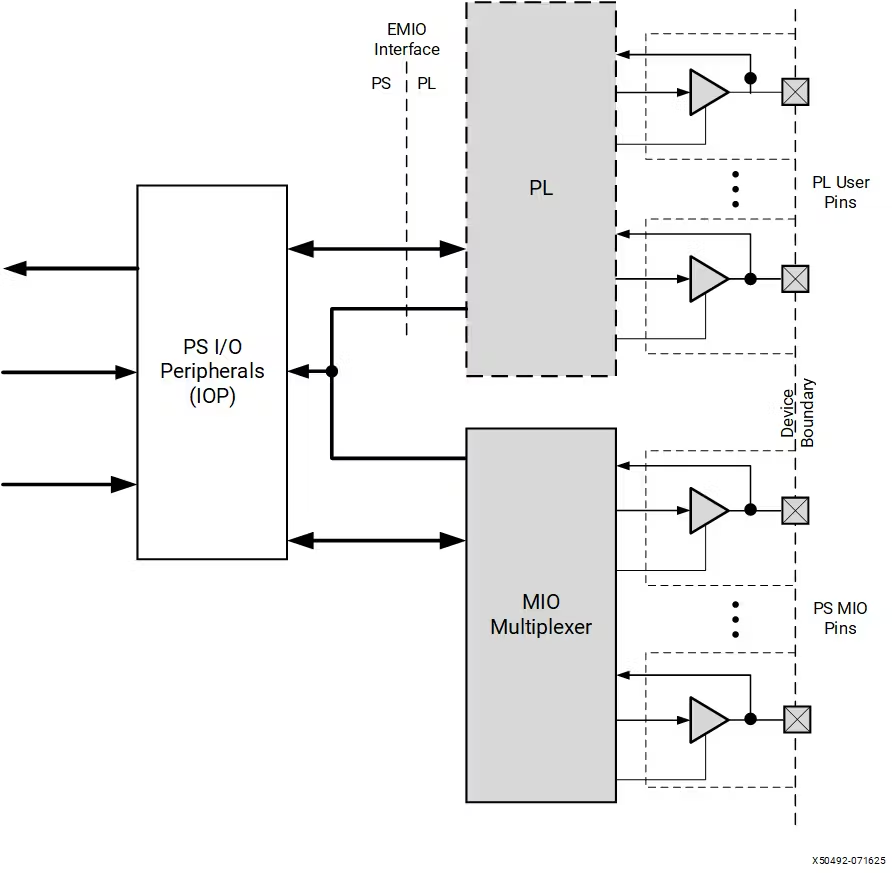
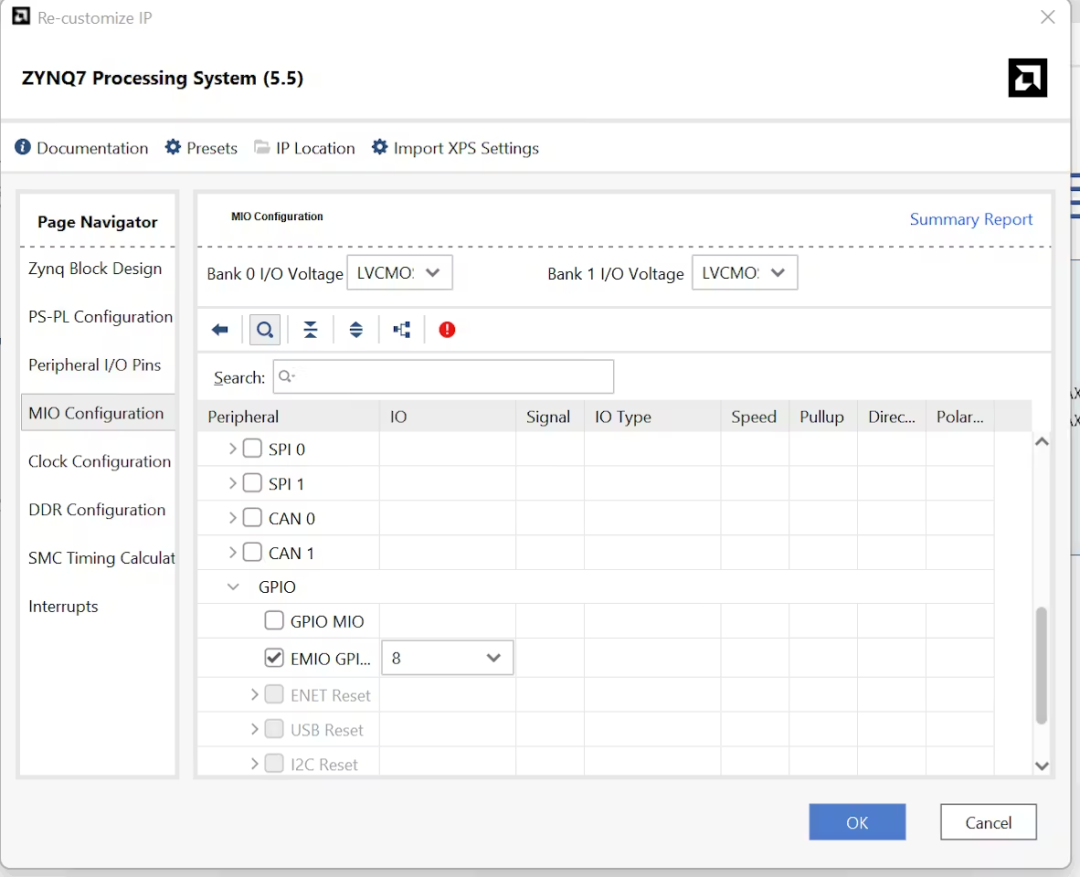
启用 EMIO:
打开电路板图。
双击处理系统。
选择 MIO 配置、I/O 外设,然后在最后打开 GPIO。勾选 EMIO GPIO,并在框中选择 8。
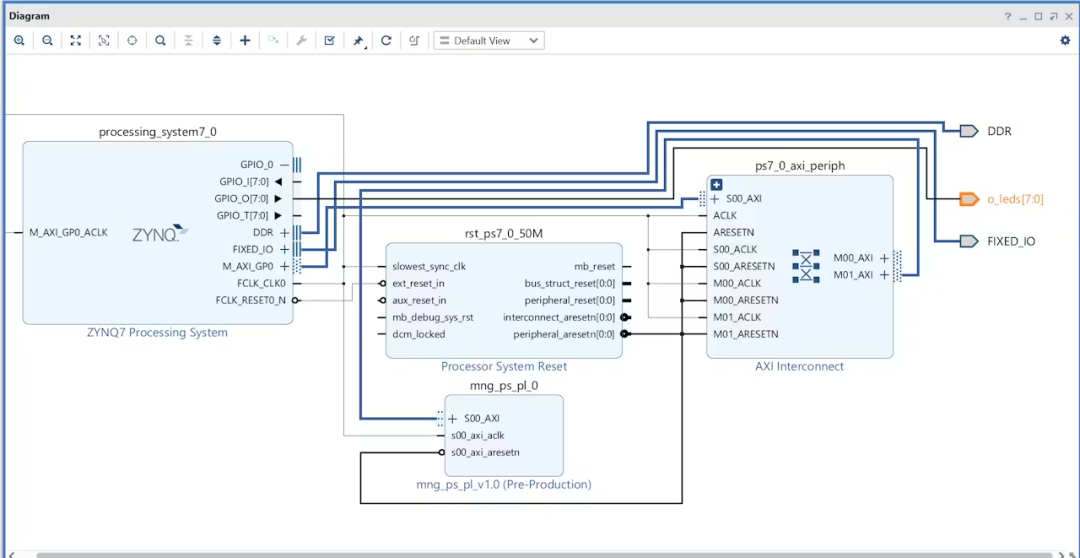
处理系统 (PS) 现在应该有一个名为 GPIO_0 的新端口,它有 3 组端口,每组 8 位 (7:0)。
右键单击 GPIO_0[7:0],然后单击“Make External”。将创建一个名为 GPIO_O_0[7:0] 的端口。
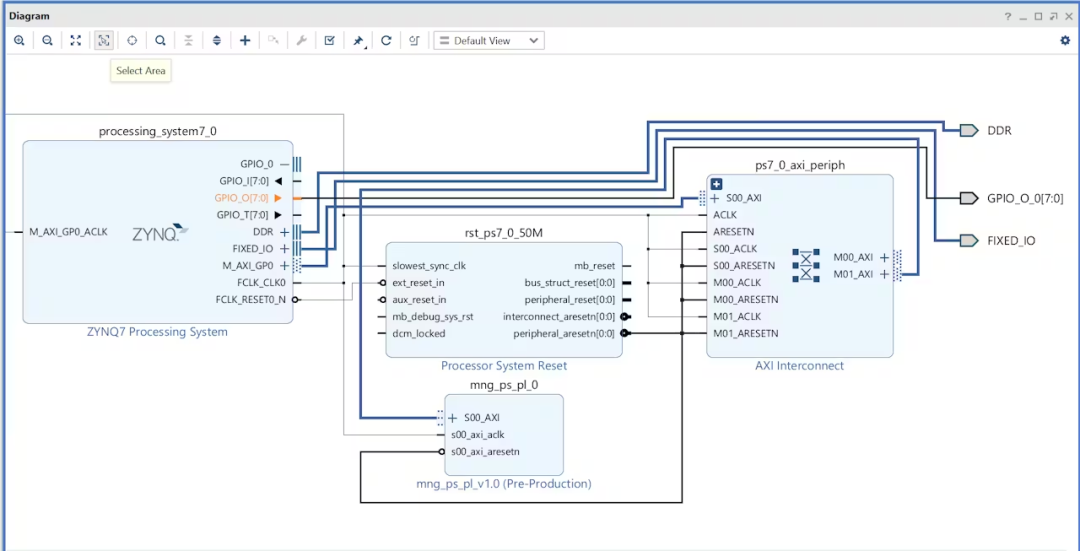
可以通过右键单击端口并选择“External Port Properties”来重命名端口。在“External Port Properties”对话框中,输入新名称即可。
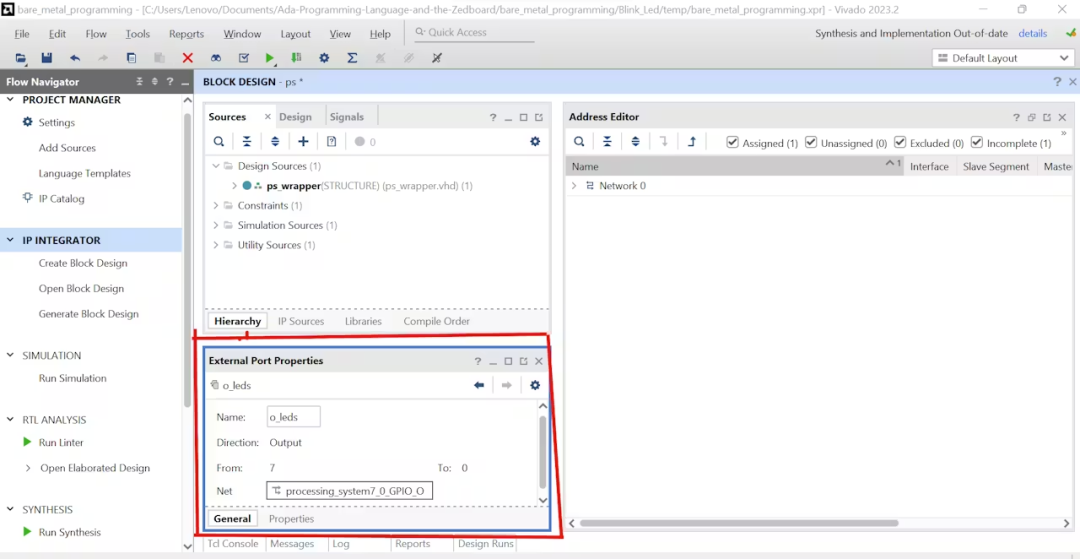
电路板图中的名称将会更新。
在源代码中,如果尚未操作,请右键单击 ps.bd 文件并选择“generate HDL wrapper”。让 Vivado 处理更新。
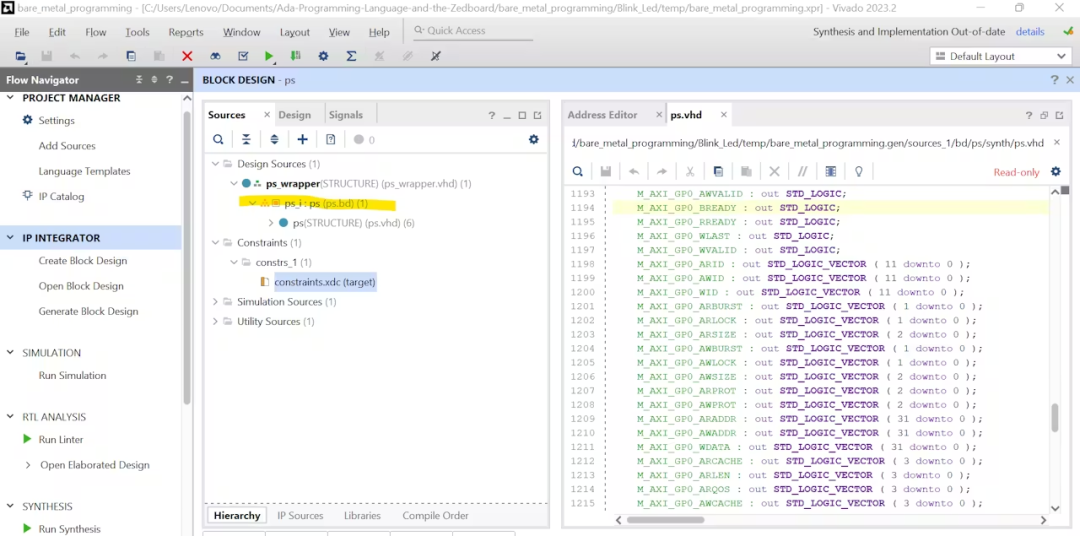
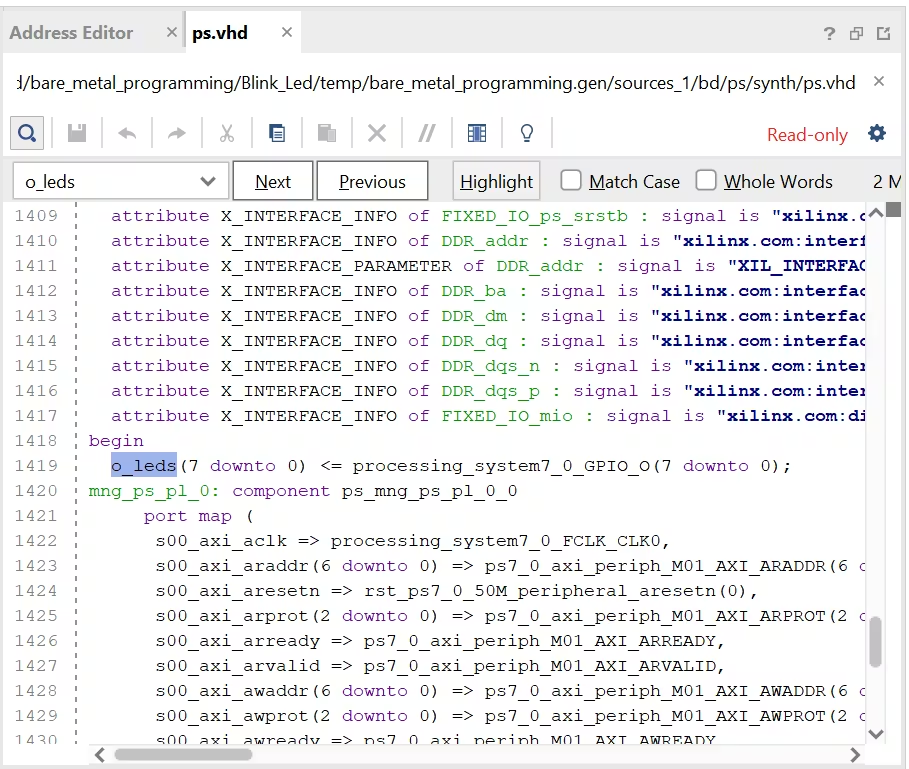
图 1.1:来自 PS 的 EMIO GPIO 输出现在通过 o_leds 路由到 FPGA。
1.2 写入约束文件
现在需要将 LED 引脚连接到刚刚创建的 o_leds 端口。该端口是 FPGA 的输入,因此也是 PS 的输出。我们将通过编写一个约束文件来实现这一点,该文件将 Zedboard 上的引脚连接到加载到 FPGA 上的 RTL 设计中的信号。
1.2.1 约束文件语法
Vivado约束文件(.xdc)使用Tcl语法为端口等设计对象分配物理和电气属性。其通用格式如下:
set_property[get_ ]
对于顶层 I/O,对象类型为 get_ports,其中端口名称必须与 RTL 设计完全匹配。例如:
set_property PACKAGE_PIN T22 [get_ports { leds_o[0]}]
set_property IOSTANDARD LVCMOS33 [get_ports { leds_o[0]}]
使用 -dict 可以在单个命令中分配多个属性:
set_property -dict { PACKAGE_PIN T22 IOSTANDARD LVCMOS33 } [ get_ports { leds_o[0]}]
花括号 {} 用于对名称进行分组(例如总线索引 leds_o[0]),以防止 Tcl 解析问题。
要点
get_ports 中的端口名称必须与顶层设计完全匹配(区分大小写)。
PACKAGE_PIN 和 IOSTANDARD 是由 FPGA 和电路板定义的设备特定属性。
文件中约束的顺序通常并不重要。
注释用#表示。
编写我们的 tcl 代码:
set_property -dict { PACKAGE_PIN T22 IOSTANDARD LVCMOS33 } [ get_ports { o_leds[0]}];
set_property -dict { PACKAGE_PIN T21 IOSTANDARD LVCMOS33 } [ get_ports { o_leds[1]}];
set_property -dict { PACKAGE_PIN U22 IOSTANDARD LVCMOS33 } [ get_ports { o_leds[2]}];
set_property -dict { PACKAGE_PIN U21 IOSTANDARD LVCMOS33 } [ get_ports { o_leds[3]}];
set_property -dict { PACKAGE_PIN V22 IOSTANDARD LVCMOS33 } [ get_ports { o_leds[4]}];
set_property -dict { PACKAGE_PIN W22 IOSTANDARD LVCMOS33 } [ get_ports { o_leds[5]}];
set_property -dict { PACKAGE_PIN U19 IOSTANDARD LVCMOS33 } [ get_ports { o_leds[6]}];
set_property -dict { PACKAGE_PIN U14 IOSTANDARD LVCMOS33 } [ get_ports { o_leds[7]}];
1.3 用于配置 GPIO 的 Ada 代码
现在我们需要将 PS GPIO EMIO 引脚配置为输出,方法是写入 GPIO 控制器的方向寄存器和输出使能寄存器,然后写入数据寄存器来驱动这些位为高或低。
Zynq 7000 SoC 技术参考手册 (UG585)(https://docs.amd.com/r/en-US/ug585-zynq-7000-SoC-TRM/Introduction?tocId=Hf6C7Oo5ABvv2hkWRoiihQ)中关于通用 I/O 部分的引言如下:
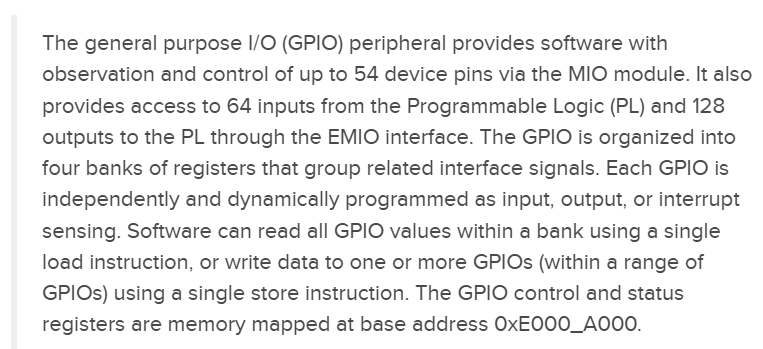
最后一句尤为重要,因为它告诉我们必须使用的 GPIO 控制寄存器和状态寄存器的基地址。此外,EMIO GPIO 连接到 bank 2 和 bank 3。
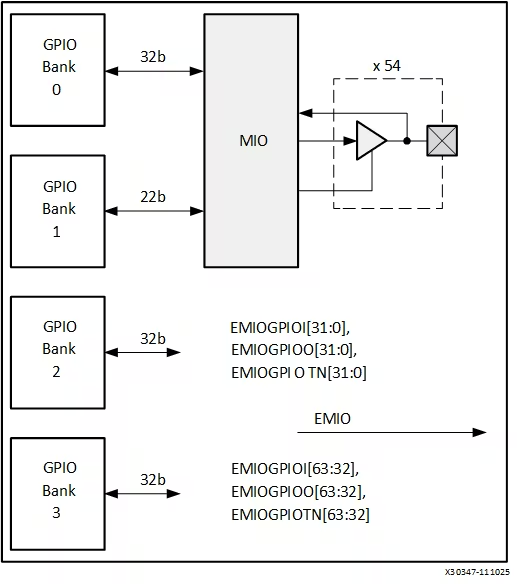
GPIO 控制寄存器和状态寄存器映射到基地址的内存中:
0xE000_A000
从我们的电路板图可知,我们正在使用 EMIO GPIO_O(7:0) 输出端口,即 EMIO 的第 7 位到第 0 位,我们通过 o_leds 端口将其连接到 PL。
因此,要向 LED 发送数据,我们必须在寄存器映射(位于UG585 的寄存器摘要部分)中找到正确的控制寄存器来控制 GPIO_O。
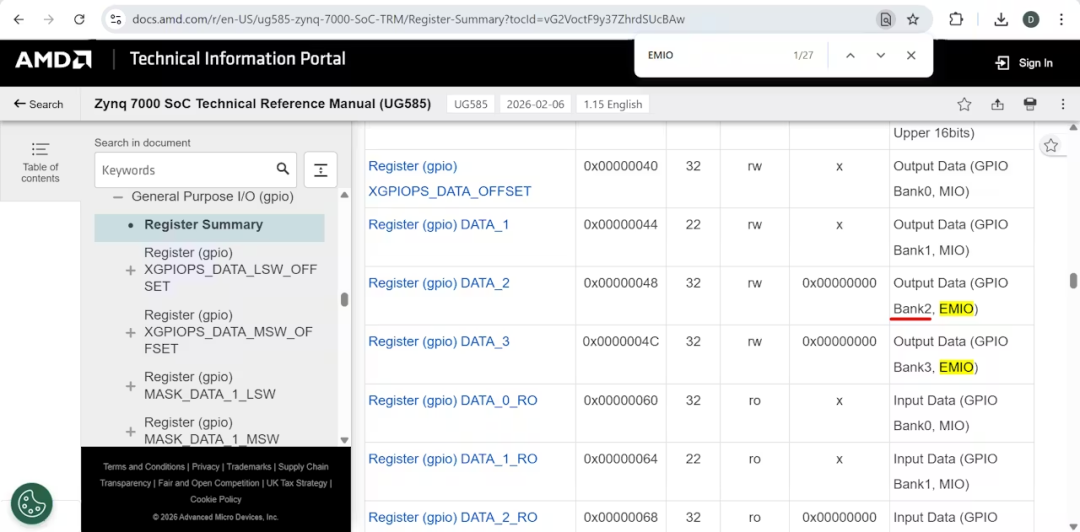
由于 EMIO[0:31] 是 bank 2,我们发现正确的寄存器是:

因此,在软件开发中我们必须:
设置方向输出 => 设置 DIRM_2 中的第 0 位
启用输出 => 设置 OEN_2 的第 0 位
写入值 => 设置/清除 DATA_2 中的第 0 位
注:应该使用MASK_DATA_LSW寄存器,因为它允许选择要写入的特定位。数据寄存器的所有32位都是一次性写入的。
1.3.1 Ada 代码 - zedboard_emio_gpio.ads
规范文件用于设置 EMIO GPIO 的基地址和偏移量。
由于这是内存映射,我们不使用访问类型,访问类型在某些方面是 Ada 版本的指针,据我所知,通常应该避免使用。
相反,我们使用所谓的表示子句,据我理解,它允许将变量(或枚举类型)与固定地址的特定内存位置或硬件寄存器关联起来,从而使程序能够直接将变量映射到物理内存(例如内存映射 I/O 寄存器),而无需使用传统的指针。
.ads 代码为:
-- Package to control the EMIO GPIO Bank 2 of the Zedboard .
-- We are only able to control 8 LEDs .
-- As this is memory mapping , we use address binding via representation
-- clauses
-- (as opposed to Access types ).
-- Access Types , essentially pointers , are typically only utilised when the
-- address is dynamic (not known at compile time ).

-- I extensively use comments as I am learning as I go!
-- I intentionally qualify everything to understandwhichfunctionis apart
-- ofwhichpackage .

with System ; -- A top - level Ada package
with System . Storage_Elements ; -- A child package of Storage .
with Interfaces ; -- defines types with exact sizes

package zedboard_emio_gpio is
use System . Storage_Elements ; -- without get a compile error :
-- possible missing with /use of System .
-- Storage_Elements .
-- It is due to use of the + ,whichneeds the
-- use clause I believe

procedure Initialise ;
procedure Set_LEDs ( Value : Interfaces . Unsigned_8 ) ;

private
-- The following is all private to hide the Hardware details .

-- Declare the GPIO Control register base address .
-- To_Address is atypeconversion as
--" Address "is a particulartypeand we have
-- a hex literal that has to be converted .
-- We use constant as the values are fixed by Hardware .
GPIO_Control_Reg_Base : constant System . Address :=
System . Storage_Elements . To_Address (16# E000_A000 #) ;

Data_2_Addr : constant System . Address :=
GPIO_Control_Reg_Base + System . Storage_Elements . Storage_Offset (16#48#) ;

DIRM_2_Addr : constant System . Address :=
GPIO_Control_Reg_Base + System . Storage_Elements . Storage_Offset (16#284#) ;

OEN_2_Addr : constant System . Address :=
GPIO_Control_Reg_Base + System . Storage_Elements . Storage_Offset (16#288#) ;

-- Now the representation clauses :

Data_2 : Interfaces . Unsigned_32 ;
forData_2' Address use Data_2_Addr ;
pragma Volatile ( Data_2 ) ; -- Need this according to chat gpt
-- suppress any optimizations that would interfere
-- with the correct reading of the volatile variables .

DIRM_2 : Interfaces . Unsigned_32 ;
for DIRM_2 'Address use DIRM_2_Addr ;
pragma Volatile ( DIRM_2 ) ;

OEN_2 : Interfaces . Unsigned_32 ;
forOEN_2' Address use OEN_2_Addr ;
pragma Volatile ( OEN_2 ) ;

end zedboard_emio_gpio ;
1.3.2 Ada 代码 - zedboard_emio_gpio.adb
主体文件 body.adb 的内容如下:
with Interfaces ; use Interfaces ; -- need the use clause to use or , + , and
-- operations etc.
-- compiler gives error otherwise .

package body zedboard_emio_gpio is

procedure Initialise is
begin
DIRM_2 := DIRM_2 or 16# FF #; -- Set bottom 8 bits to 1 via bitwise or
-- operation .
-- 1 indicates output .
-- Wedothis to notsetor change any other
-- bits .
-- We could have used the MASK_DATA_LSW also
.

OEN_2 := OEN_2 or 16# FF #; -- 1 indicates output is enabled
end Initialise ;

procedure Set_LEDs ( Value : Interfaces . Unsigned_8 ) is
begin
Data_2 := ( Data_2 and not 16# FF #) or Interfaces . Unsigned_32 ( Value ) ;
end Set_LEDs ; -- Interfaces . Unsigned_32 ( Value )
-- is atypeconversion
-- Converts 8 -bit Value to 32 bits
-- unsigned .

end zedboard_emio_gpio ;
1.3.3 Ada 代码 - main.adb
在 main.adb 文件中,我们导入了 Ada.Real_time 包,这允许我们使用 Seconds 函数和 Clock 函数来设置 LED 灯亮起和熄灭之间的延迟。
十六进制 AA (0xAA) 表示 LED LD1、LD3、LD5 和 LD7 将交替亮灭,而其他 LED 则始终处于关闭状态。
with zedboard_emio_gpio;
with Interfaces;
with Ada.Real_Time; use Ada.Real_Time;

procedure Main is

 D  : Time_Span := Seconds (5); -- D is of Type Time_Span, Seconds is afunction.
                  -- Nanoseconds also existsforexample
 Next : Time := Clock + D;    -- What is dif between clock and clock time?

begin
 zedboard_emio_gpio.Initialise;

 delay until Next;
 Next := Next + D;

 loop
   zedboard_emio_gpio.Set_LEDs (16#AA#);
   delay until Next;
   Next := Next + D;

   zedboard_emio_gpio.Set_LEDs (16#00#);
   delay until Next;
   Next := Next + D;
 end loop;

end Main;
1.3.4 Ada 代码 - blink_led.gpr
最后提供了 .gpr 文件。项目最初没有使用 Alire。为了将其转换为 alr 项目,我在终端中切换到项目目录并运行了以下命令:
alr init --bin blink_led --in-place
这将创建一个.gpr文件。
然后不得不稍微更新一下.gpr文件,因为它使用了错误的main文件名(把它改成了“main.adb”)。
其次,源目录没有指向main.adb 文件所在的位置(根目录)。这个问题通过在 Source_Dirs 中设置“.”来解决。
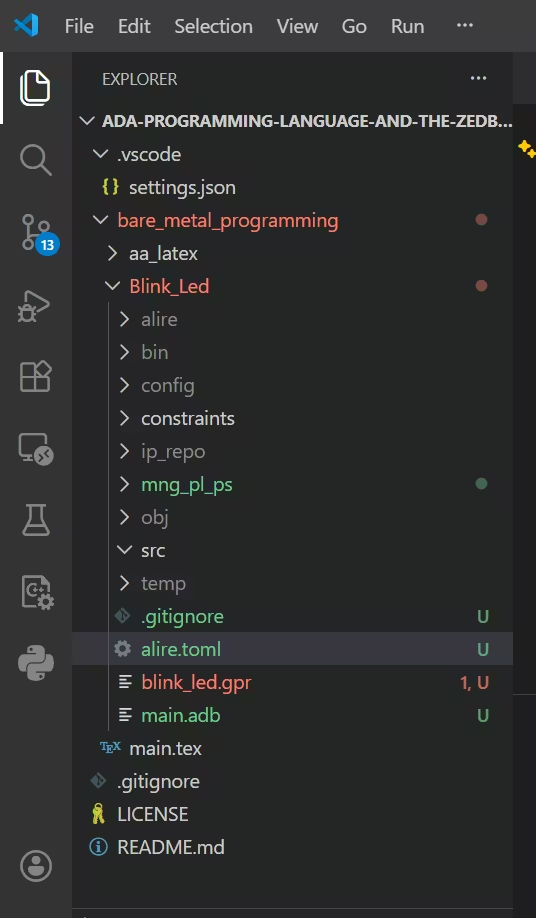
.gpr 代码如下:
project Blink_Led is

 forRuntime ("Ada") use"embedded-zynq7000";
 forTarget use"arm-eabi";

 forSource_Dirs use (".","mng_pl_ps/","config/");
 forObject_Dir use"obj/";
 forExec_Dir use"bin";
 forMain use ("main.adb");

end Blink_Led;
手动添加的
forRuntime ("Ada") use"embedded-zynq7000";
 forTarget use"arm-eabi";
这是必需的。“for Runtime”命令告诉Gnat编译器要编译的CPU/架构,在本例中是zynq700。还有其他选项,例如light-zynq7000,但这不包含Real_Time库,因此Alire会报错。
“for Target”命令告诉编译器要为哪个指令集/工具链生成代码,在本例中是使用EABI(嵌入式应用二进制接口)的ARM指令集/工具链。这确保编译后的输出与Zynq上的ARM Cortex-A9处理器兼容。
以上内容来自此链接(https://docs.adacore.com/gnat_ugx-docs/html/gnat_ugx/gnat_ugx/arm-elf_topics_and_tutorial.html)。
完成所有这些步骤后,运行“alr build”命令。
这应该会在名为 bin 的文件夹中生成一个 .elf 文件。它可能就叫 main,把它重命名是为了明确文件扩展名,即 main.elf。
1.4 Vitis:软件方面的设置
打开Vitis
在 C 盘或其他路径下创建一个名为 workspace 的文件夹。
打开 Vitis。选择“打开工作区”。
选择文件→新建组件→平台。
给它起个名字。
选择硬件设计,然后浏览并找到 .tcl 文件。
使用独立操作系统。
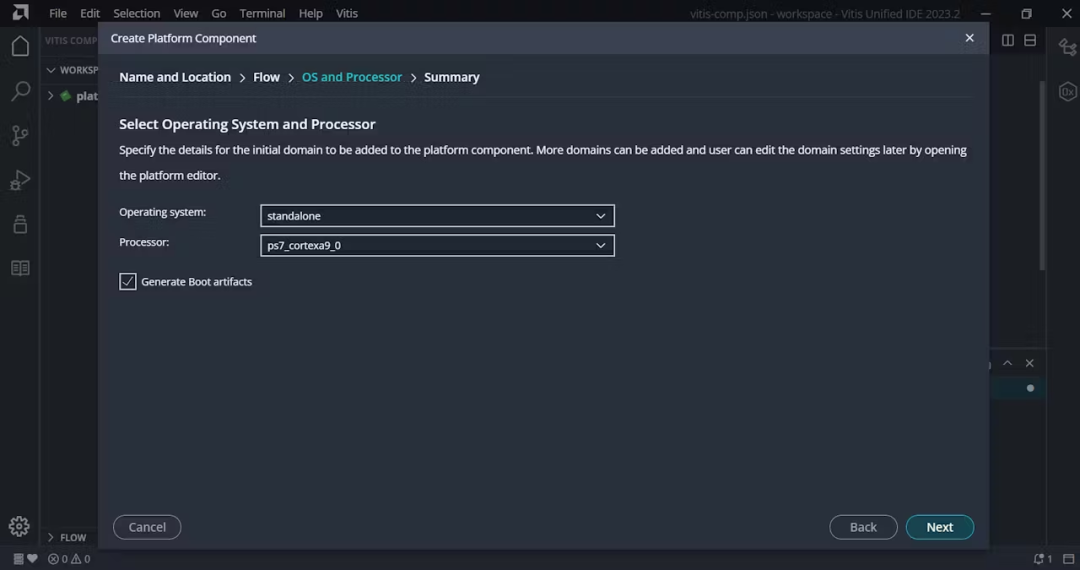
选择“生成启动工件”。
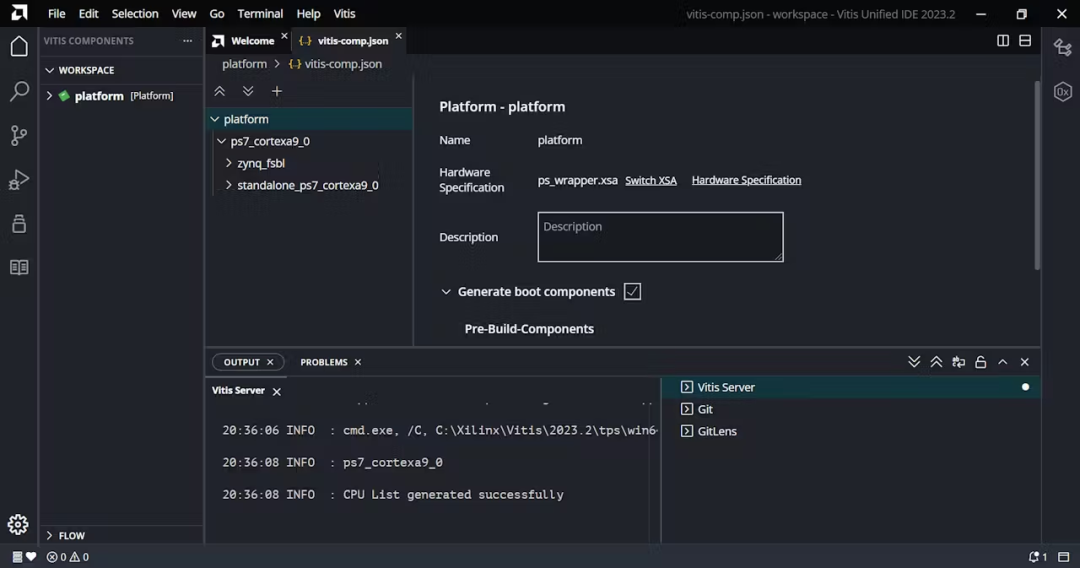
完成并搭建平台。
应该用Vitis搭建一个平台。
完成上述步骤后,即可通过选择 Vitis->Program Device 将比特流下载到 Zedboard。
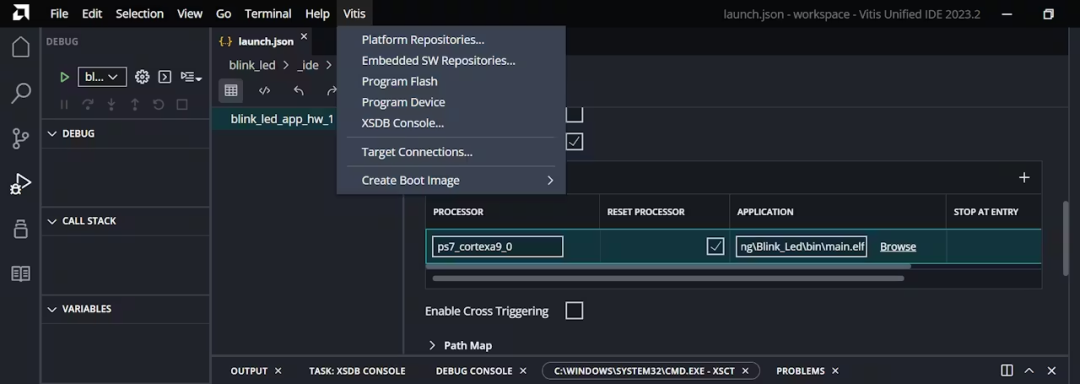
现在需要下载 main.elf 文件以便在处理系统上运行。使用 Xilinx 软件命令行工具 (XSCT) 完成了此操作。在终端中执行以下操作:
打开终端并启动 XSCT:
xsct
通过 JTAG 连接到目标板:
connect
列出可用目标:
targets
应该看到类似如下的输出:
1 APU
2 ARM Cortex−A9 MPCore#0( Vec tor Catch )
3 ARM Cortex−A9 MPCore#1( Running )
4 xc7z020
选择第一个 ARM 内核(CPU 0):
targets 2
重置处理器以确保其处于清洁状态:
rst -processor
将编译后的 Ada 可执行文件(.elf)下载到内存中,例如:
dow"C:/ path /to/ your / project /bin/ main.elf "
开始执行:
con
程序运行后:
ARM Cortex-A9 开始执行 Ada 应用程序
ARM Cortex-A9 开始执行 Ada 应用程序
主过程通过 GNAT 运行时调用。
通过 EMIO 连接的 LED(LD1、LD3、LD5、LD7)应根据已实现的逻辑开始闪烁。
项目完成。
总结
这不是“用Ada点灯”,而是“用另一种语言重新理解Zynq”